Actions
Bug #2409
openFeature #1066: Development and Unit Testing
Module #1281: Bug correction
Activity #2323: Resolve issues for pilot deployment - Version 2
Imageviewer page -- DR lesion types not getting updated
Start date:
03/31/2024
Due date:
% Done:
100%
Estimated time:
Planned Due Date:
Description
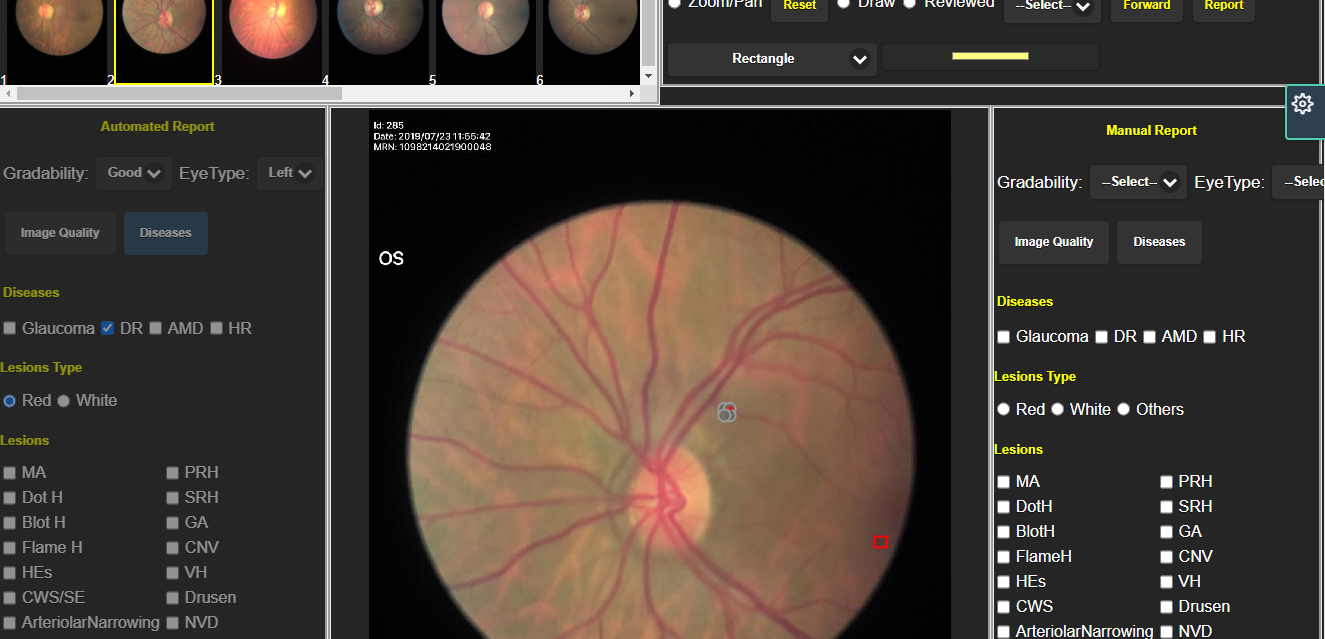
In auto analysis DR marked as a rectangle only, and the option of RED and WHITE is shown that is ok. When i click Update With AI get AI marking in Manual.Can a user select the rectangle and give the lesion category label as MA or BLOT H .
is it possible?
Files
Updated by Sreeshna T over 2 years ago
- Status changed from New to Resolved
- % Done changed from 0 to 100
yes. if someone marking as lesions manually the rectangle with label will come. if some selected the lesions under red category red button will checked state. if it is white lesion is marking white button will checked state.
Updated by Thara S Pillai over 2 years ago
- Subject changed from Imageviewer page to Imageviewer page -- DR lesion types not getting updated
- Status changed from Resolved to New
- Assignee changed from Sreeshna T to Jiji P B
- % Done changed from 100 to 0
User should be able to mark lesion type for the red/while lesion category markings discovered by AI.
Resolve issue.
Updated by Jiji P B over 2 years ago
- Status changed from New to Resolved
- % Done changed from 0 to 100
Actions